Modern software systems are increasingly complex, and ensuring their performance under real-world conditions is critical to delivering reliable and scalable applications. Traditional performance testing often focuses on high-level metrics such as average response time or throughput. While these metrics are useful, they can obscure deeper system inefficiencies and bottlenecks. To uncover these hidden issues, a more granular and methodical approach is required—one that examines the behavior of individual system components under stress.
This article introduces a performance engineering workflow that integrates profiling techniques with the USE Method (Utilization, Saturation, and Errors) to diagnose and resolve performance issues. By combining performance testing tools like Hyperfoil with low-level profilers such as async-profiler and perf, we demonstrate how to identify CPU stalls, cache misses, and poor memory access patterns. Through a real-world benchmarking scenario, we show how profiling data can guide code optimizations and system configuration changes that lead to measurable improvements in Instruction Per Cycle (IPC) and overall system responsiveness.
Software Development Life Cycle
A software developer implements features based on defined requirements—such as creating multiple endpoints to solve a specific business problem. Once development is complete, the performance engineering team gathers SLAs from stakeholders and designs performance tests that reflect real business use cases. These tests typically measure metrics like average response time. For each release that affects the business logic, the performance tests are rerun to detect any regressions. If a regression is found, the team receives feedback to address it.
There is nothing wrong with this approach, but we can go even further.
Personas
Software Developer: A professional who designs, builds, tests, and maintains software applications or systems.
Performance Engineering: Ensures that a software system meets performance requirements under expected workloads. This involves creating and maintaining performance tests—using tools like Hyperfoil and web-based scenarios—to simulate real-world usage. The results provide valuable feedback to the team. If the system passes these tests, the product is considered ready for General Availability (GA).
Profiler Performance Engineering: Analyzes performance test results by profiling the source code to uncover system bottlenecks. The process typically begins by identifying which resource—CPU, memory, disk, or network— the team has chosen to stress, guiding the analysis toward the root cause of any performance degradation.
Java Developer Persona Belt
Software Developer: Eclipse IDE, IBM Semeru JDK
Performance Engineering: Hyperfoil and a web-based application
Profiler Performance Engineering: async-profiler, jfrconv, perf, sar
The USE Method
According to Brendan Gregg, The Utilization Saturation and Errors (USE) Method is a methodology for analyzing the performance of any system. It directs the construction of a checklist, which for server analysis can be used for quickly identifying resource bottlenecks or errors. It begins by posing questions, and then seeks answers, instead of beginning with given metrics (partial answers) and trying to work backwards.
Terminology definitions:
The terminology definition is:
resource: all physical server functional components (CPUs, disks, busses, …)
utilization: the average time that the resource was busy servicing work
saturation: the degree to which the resource has extra work which it can’t service, often queued
errors: the count of error events
The metrics are usually expressed in the following terms:
utilization: as a percent over a time interval. eg, "one disk is running at 90% utilization".
saturation: as a queue length. eg, "the CPUs have an average run queue length of four".
errors: scalar counts. eg, "this network interface has had fifty late collisions".
The benchmark
The benchmark scenario consists of three main components: a load generator, a System Under Test (SUT) running on an application server, and a database. The load generator initiates requests to various SUT endpoints, which in turn perform operations such as inserts, updates, and selects on the database. The benchmark is divided into two phases: warmup and steady state. During the warmup phase, the system gradually ramps up the number of requests over a defined period, aiming for a smooth transition into the steady state. This controlled increase helps stabilize the system before reaching the target injection rate for sustained testing.
Hands-on
In this example, we’ll examine a real-world scenario that occurred while benchmarking an application.
SUT CPU analyses
We can start by looking for the “perf stat” for the SUT’s application PID. "perf stat" is a powerful Linux command-line tool that gives you high-level statistics about a program’s performance. It uses hardware performance counters in your CPU to measure things like instructions executed, CPU cycles, cache misses, and branch mispredictions. It’s a great first step to understanding your application’s behavior at a low level.
The result for the performance testing is the following.
Performance counter stats for process id '3724985':
      3,707,235.65 msec task-clock                #    5.296 CPUs utilized
This metric indicates that 5.2 CPU cores are being utilized. For this test, we have a constraint of only 15 CPU cores
available. Therefore, 5.2 ÷ 15 equals approximately 34%, meaning the CPU is busy 34% of the time. This suggests that
the SUT is not a highly utilized resource. Since the SUT CPU utilization was only at 34%, we had plenty of headroom
to experiment. We decided to drive a higher load by doubling the injection rate of the loader to observe the impact.
However, this is not guaranteed to succeed, as other bottlenecks might limit the outcome. In our case, the loader
could sustain the 2x increase in injection rate, and the new perf stat output for the SUT is:
Performance counter stats for process id '3854032':
      8,798,820.34 msec task-clock                #   12.570 CPUs utilized
        72,884,739      context-switches          #    8.283 K/sec
        30,504,245      cpu-migrations            #    3.467 K/sec
           192,855      page-faults               #   21.918 /sec
20,804,314,839,811      cycles                    #    2.364 GHz
13,372,592,699,670      instructions              #    0.64  insn per cycle
2,535,826,054,792       branches                  #  288.201 M/sec
   148,654,216,727      branch-misses             #    5.86% of all branches
     700.009883946 seconds time elapsed
Our CPU resource showed 83% saturation over a 700-second interval, with the same error rate observed when CPU utilization was previously at 34%. This metric provides a strong starting point for deeper investigation. The next metric that we can analyze is the Instruction Per Cycle. The current value is 0.64. 0.64 is a low value for IPC. It means that the CPU is stalled and not computing.
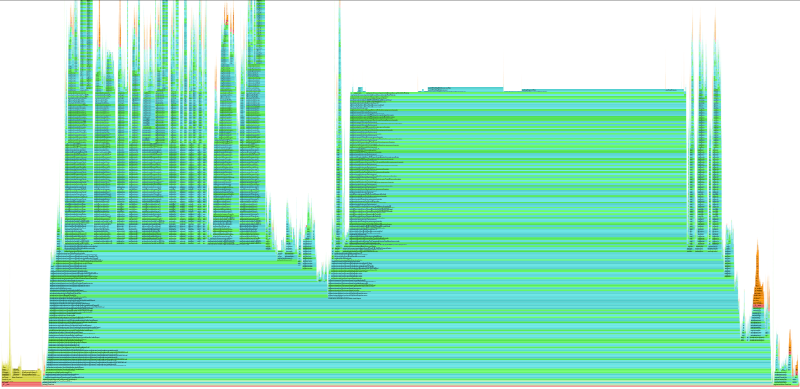
The CPU is stalled, not "stressed." It’s spending most of its time waiting for data instead of doing useful work. In order to investigate the root cause, we can use async-profiler and monitor the cache-miss event. The output of the profiler can be a flame graph as the following.

The Analysis: Visualizing the Bottleneck
Upon analyzing the cache-misses flame graph, a clear pattern emerges. The function triggering the most CPU stalls—is
java.util.HashMap$KeyIterator.next.
When we correlate this visual data with the source code, we see that the application is iterating over a
large HashSet (which uses a HashMap internally). While this appears to be a standard operation in Java, the
hardware reality is quite different.
"Pointer Chasing"
The performance penalty here stems from memory layout and data dependency.
Iterating over a HashMap is effectively a Pointer Chasing operation. Unlike an ArrayList, where elements are
stored contiguously in memory (allowing the CPU to calculate the next address mathematically), a HashMap stores
data in scattered nodes. To move from one element to the next, the CPU must:
Fetch the current node from memory.
Read the pointer inside that node to find the address of the next node.
Fetch the next node from that new address.
The Consequence: Breaking Instruction Level Parallelism
This structure creates a critical Data Dependency. The CPU cannot know where to look for the next item until the current item has been fully retrieved.
This dependency chain breaks the CPU’s ability to use Instruction Level Parallelism (ILP).
Modern CPUs attempt to "speculatively load" data by fetching future elements while processing current ones.
However, because the memory addresses in a HashMap are random and dependent on the previous node,
the hardware prefetcher is rendered useless.
Instead of processing data in parallel, the CPU pipeline is forced to stall completely between every element,
waiting hundreds of cycles for data to arrive from main RAM. This explains the high cache-miss rate and the
low IPC (Instructions Per Cycle) observed in our perf stats.
Validating the Hypothesis: Correlating Cycles with Misses
However, observing a high number of cache misses is not enough to declare a verdict. A function could generate millions of cache misses but execute so rarely that it impacts only 1% of the total runtime. To be certain this is our bottleneck, we must correlate the "Misses" (the event) with the "Cycles" (the time).

We compared the cache-misses flame graph against the cycles and the correlation was:
In the cycles profile: The HashMap iteration, Integer.intValue and String.equals logic dominated the graph, accounting for the vast majority of CPU time.
In the cache-misses profile: These exact same methods appeared as the widest bar.
This overlap confirms the diagnosis: The application is not just "busy"; it is stalled. The high CPU usage seen in our original top output wasn’t due to complex calculation, but rather the CPU burning cycles while waiting for data to arrive from memory to satisfy the HashMap’s pointer-chasing requirements.
Acknowledgments
All this work was guided and supervised by Francesco Nigro.